Currency

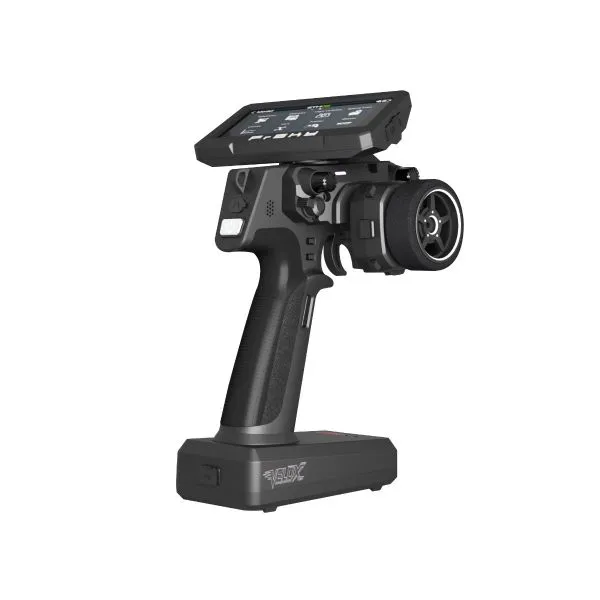

FrSky Velox VX10 Meteorite Grey
$259.99
Availability:
In stock
SKU
03010289
ETHOS Surface Edition & Flexible RF Module Solutions
The Velox VX10 surface radio is equipped with an ETHOS operating system specifically for RC cars and boats. Building on its powerful and feature-rich capabilities, the operating system has been further refined and optimized for surface operation scenarios, helping reduce the learning curve for users adopting a new system while delivering excellent configuration flexibility and super-low-latency control.
The Velox VX10 series features a built-in 900MHz / 2.4GHz TD-ISRM RS RF module, supporting pairing with a full range of FrSky receivers across TD, TW, ACCESS, and ACCST D16 protocols. In addition, the VX10 series is equipped with a Lite-type external module bay, allowing users to flexibly install and pair with a wider variety of RF protocol modules or functional modules.
The Velox VX10 surface radio is equipped with an ETHOS operating system specifically for RC cars and boats. Building on its powerful and feature-rich capabilities, the operating system has been further refined and optimized for surface operation scenarios, helping reduce the learning curve for users adopting a new system while delivering excellent configuration flexibility and super-low-latency control.
The Velox VX10 series features a built-in 900MHz / 2.4GHz TD-ISRM RS RF module, supporting pairing with a full range of FrSky receivers across TD, TW, ACCESS, and ACCST D16 protocols. In addition, the VX10 series is equipped with a Lite-type external module bay, allowing users to flexibly install and pair with a wider variety of RF protocol modules or functional modules.
Ambidextrous L/R-Handed Control Design & Comprehensive Adjustment Capabilities
To accommodate users with different hand preferences, the Velox VX10 series was designed from the outset with a simplified left/right conversion mechanism for its functional modules. By simply swapping the steering wheel module and the external RF module using screws, and pairing this with a 180° rotatable color touchscreen, the difficulty of switching between left- and right-handed operation is greatly reduced. From both practical usage scenarios and ergonomic design perspectives, this also enhances the visual experience when configuring and operating the system via the screen.
The steering wheel supports customizable adjustment within a maximum travel angle of 26° inward and outward on both sides, with angle positioning achieved through damping holes. Users can also adjust the wheel’s spring tension via dedicated adjustment points. For users accustomed to fixed steering angles and specific spring tension, the VX10’s adjustable design minimizes the need for prolonged adaptation, allowing for quick and comfortable use.
The throttle/brake trigger comes with multiple size options and a convenient replacement system. Combined with adjustable mounting positions for forward and backward trigger distance, it ensures comfortable handling for users with various hand sizes.
The steering wheel module and grip handle provide users with 2 knobs, 2 three-position switches, 4 momentary buttons, and 6 trim buttons. Among them, the T5, T6, and SF switches are symmetrically mirrored on both sides of the grip, ensuring that users retain the same number of input controls after switching between left- and right-handed configurations.
A Wide Range of Interface Configurations
The Velox VX10 features built-in flash storage and includes a TF card slot, allowing users to expand storage capacity according to the needs. Like all ETHOS series radios, the Velox VX10 is equipped with S.Port, 3.5mm audio output, and USB-C interfaces. By connecting to FrSky compatible devices via the S.Port, users can perform device firmware upgrades and configuration. Meanwhile, connecting to the FrSky Suite App via USB-C achieves more advanced features such as system updates, file management, model configuration, etc.. The USB-C port also supports lithium battery charging, and when paired with the high-capacity battery compartment, ensures long-lasting power for extended use.
FEATURES
- ETHOS Operating System for Surface Series Radios
- Built-in 900M/2.4G TD-ISRM RS RF Module & Lite-Type External RF Module Slot
– Supports TD, TW, ACCESS, and ACCST D16 modes
– Capable of More RF protocols via the External RF modules - Ambidextrous L/R-Handed Swapping Control Design
– The steering & external RF function modules can be simply swapped
– 180° Rotatable 800×480 Resolution Outdoor High-Brightness Touchscreen Color Display
– Provides more easily operable trims (×2) and buttons (×1), positioned on both sides of the handle - Built-in Flash Storage & External TF card slot for storage extension
- Features an S.Port interface for external device configuration and upgrades
- Supports video transmission via HDMI and AV interfaces (VX10 HD edition)
- High-speed PARA Wireless Training System
- USB-C Port Included
– Supports Recharge System for 2S Li-ion Battery
– System upgrades & Data transfer and configurations - Throttle & Brake Triggers
– Multiple Sizes & Metal Trigger Available (Optional)
– Adjustable Forward/Backward Travel Distance - Ergonomic Steering Control Wheel Modular Design with Various Input Controls
– Adjustable Spring Tension & Adjustable Inner/Outer Deflection Angle & Positioning Damping
– Equipped with multiple trims (×4) and momentary buttons (×3)
– Thumb-accessible control knobs (×2) & Three-position switches (×2) - Provides a speaker and 3.5mm audio jack for headphones
- Provides a Big Size Battery Compartment for the Battery Capacity Upgrade
- Supports One-Handed Control Accessory Installation (Optional)
SPECIFICATIONS
- Dimension: 192×193×72mm (L×W×H)
- Weight: 560g (Battery Incl.)
- Operating System: ETHOS
- Internal RF Module: TD-ISRM RS
- 4.3” Touch-Screen Display Resolution: 800×480
- Number of Channels: Up to 24 Channels
- Operating Voltage Range: 6.5V ~ 8.4V (2S Li-Battery)
- Operating Current: 400mA@7.4V (typ.)
- Operating Temperature: -10℃ ~ 60℃ (14℉~140℉)
- Battery Bay Size: 93.5×55×21.5mm (L×W×H)
- Data Transmission & Charging Interface: USB Type-C
- USB Adaptor Voltage and Current: 5V+0.2V, ≥2.0A
- Compatibility: ACCST D16 / ACCESS / TW / TD modes
Write Your Own Review
